# Виджеты

<figure><img src="/files/8rm7Y583OY4RVOht0hnf" alt=""><figcaption></figcaption></figure>

Кликните на эту кнопку. Далее в нижнем правом углу кликните на иконку шестеренки чтобы открыть панель настроек слева:

<figure><img src="/files/K9x3OMyhHohA0vZJdyxU" alt=""><figcaption></figcaption></figure>

Вы можете указать название виджета, описание, добавить баннер, создать ссылки и настроить цвет кнопок. В качестве ссылок можно использовать как сторонние ссылки, так и прямые ссылки на любые сценарии чат-ботов вашего проекта:

<figure><img src="/files/CxQHypGnhJ84q3bFREnX" alt=""><figcaption></figcaption></figure>

<figure><img src="/files/iaG0EseRrBMAFmmJ9UYh" alt=""><figcaption></figcaption></figure>

<figure><img src="/files/LBVrVF9boOQ0DgfMNdse" alt=""><figcaption></figcaption></figure>

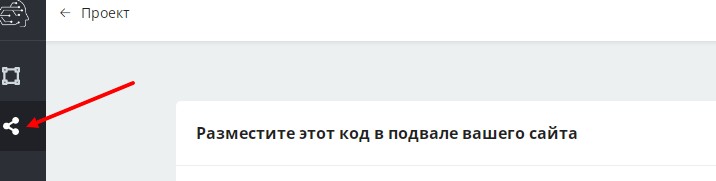
После проведения всех настроек нажмите на иконку "поделиться" в левой панели и скопируйте код для размещения в подвале вашего сайта:

<figure><img src="/files/CubmhlP0hLP3Flxp4S25" alt=""><figcaption></figcaption></figure>

Пример виджета можно увидеть на нашем сайте:

<figure><img src="/files/3IjaUU4cA5Qm0BPHq574" alt=""><figcaption></figcaption></figure>

Подробнее можно узнать из нашей видео инструкции:

{% embed url="<https://youtu.be/46tPge9WAkA>" %}


---

# Agent Instructions: Querying This Documentation

If you need additional information that is not directly available in this page, you can query the documentation dynamically by asking a question.

Perform an HTTP GET request on the current page URL with the `ask` query parameter:

```
GET https://help.watbot.ru/sozdat-vidzhet.md?ask=<question>
```

The question should be specific, self-contained, and written in natural language.
The response will contain a direct answer to the question and relevant excerpts and sources from the documentation.

Use this mechanism when the answer is not explicitly present in the current page, you need clarification or additional context, or you want to retrieve related documentation sections.